Product
The whole studio, one system.
From the front desk in the morning to payroll at the end of the month. Here's what it does — and where something is still on the way, we say so.




Today · 4 rooms, 3 instructors
14 sessions · 2 classes · 1 waitlist
One calendar
Never double-book a coach, a room, a reformer or a machine.
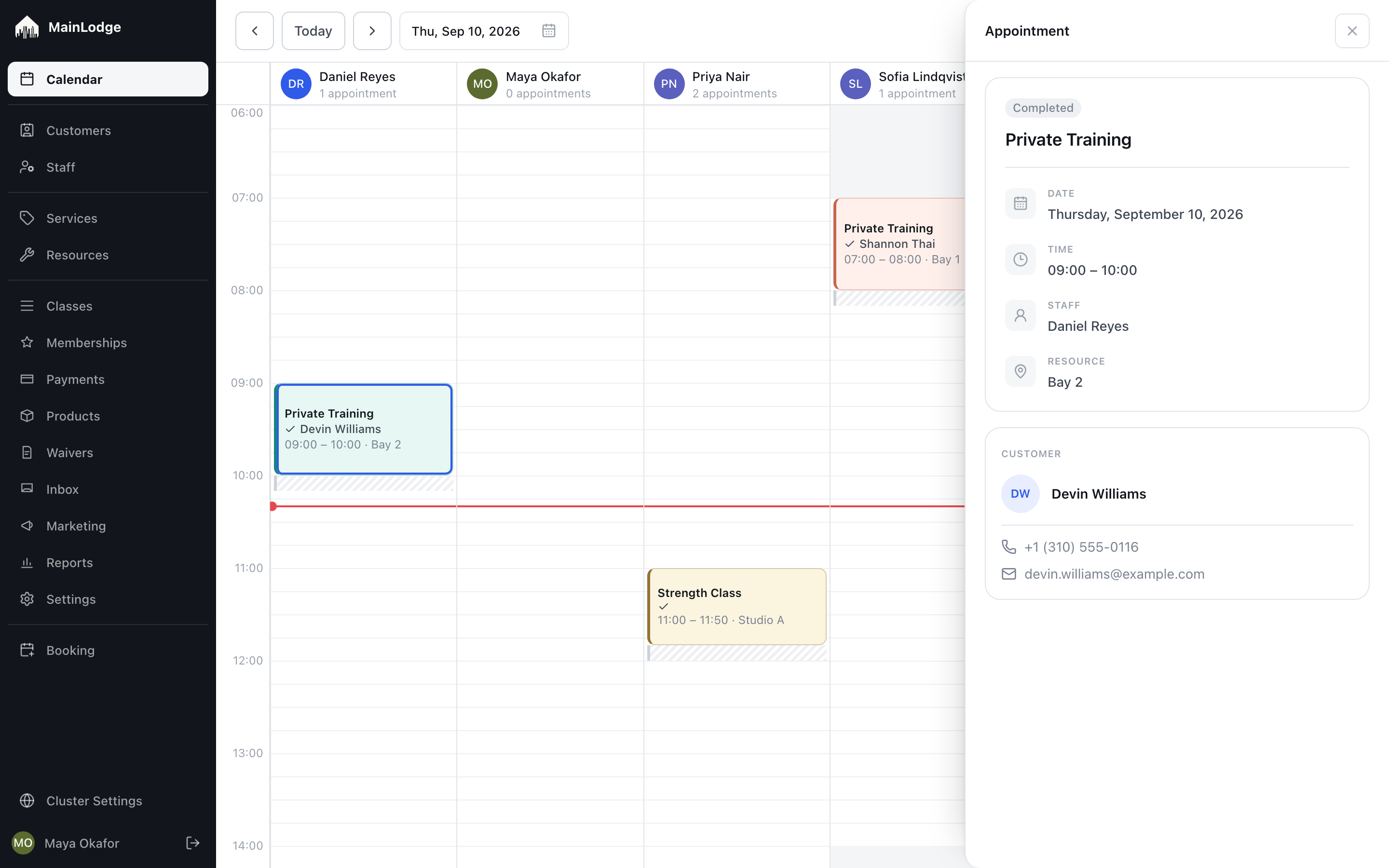
Private sessions and classes on one calendar, a column per instructor, and the hours people don't work greyed out. MainLodge checks everything a booking needs before it's confirmed.
-
Day and week calendar
Every appointment on one calendar, a column per instructor, and a week view for any one person. Drag an appointment to move it.
-
Never double-book anyone or anything
MainLodge checks the coach, the room and the equipment before a booking is confirmed — so the front desk never has to.
-
Set-up time and working hours
Add clean-up or set-up time around a service, and grey out the hours each person doesn't work.
-
Rooms, bays and equipment
Tell MainLodge what a session physically needs — a reformer, a simulator, a room — and it books whichever one is free.
-
Booking questions and add-ons
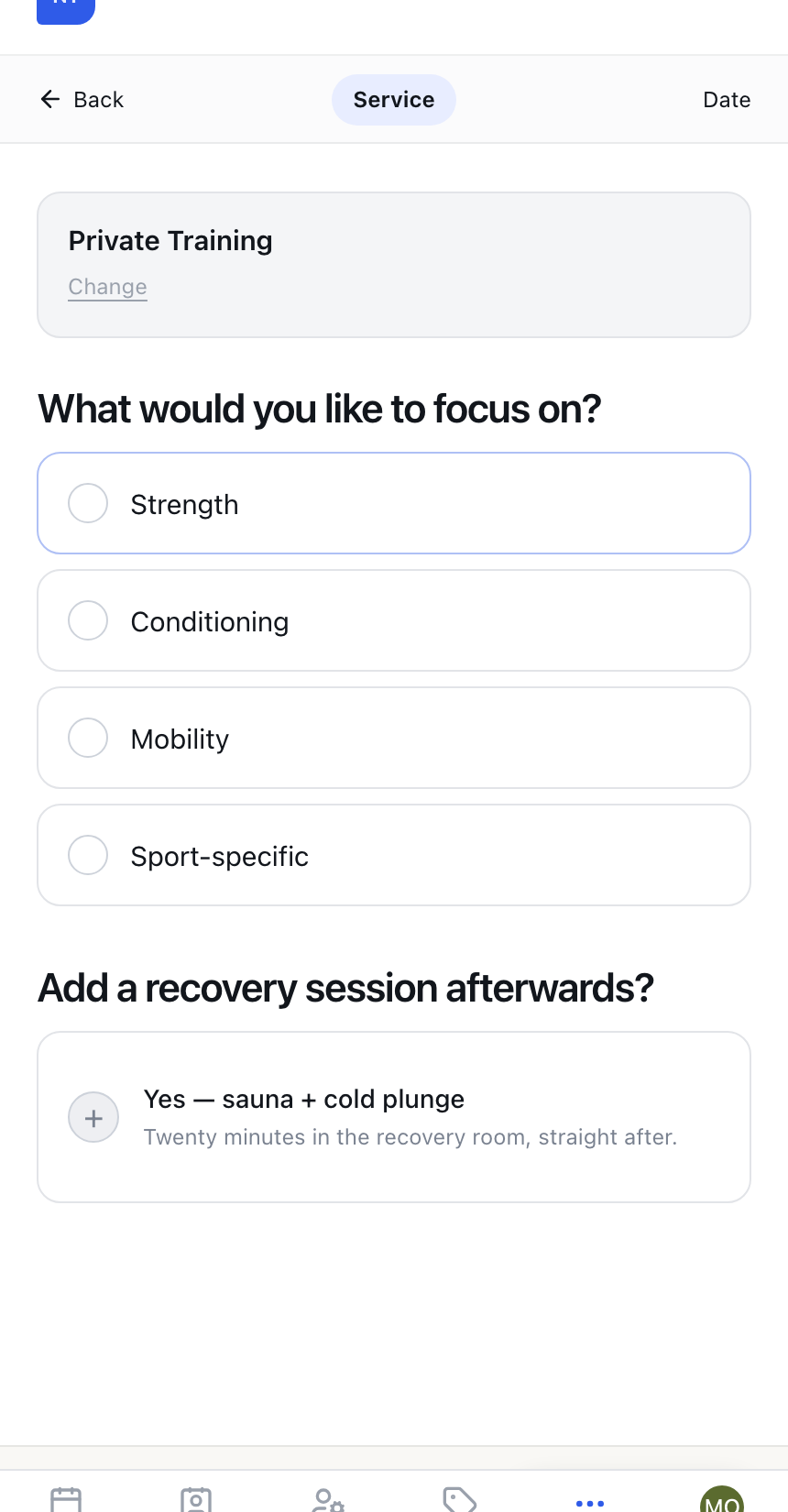
Ask a question when someone books — ski or snowboard, which focus — and let the answer add time, add a service, or pick who can teach it.
-
Standing appointments On the roadmap
Book the same slot every week, then change one week or the whole series.
-
Book someone in one text On the roadmap
Hold a slot and text the client a link; they add their details and a card in under a minute. If they don't, the hold lets go by itself.
-
Waitlists that fill themselves On the roadmap
When a spot opens up, the next person in line is told automatically.
-
Everything on the same calendar On the roadmap
Groupon and ClassPass visits, paid staff time and blocked-off hours all sit on one calendar and all count correctly at month end.
Online booking
Clients book themselves. You set the rules.
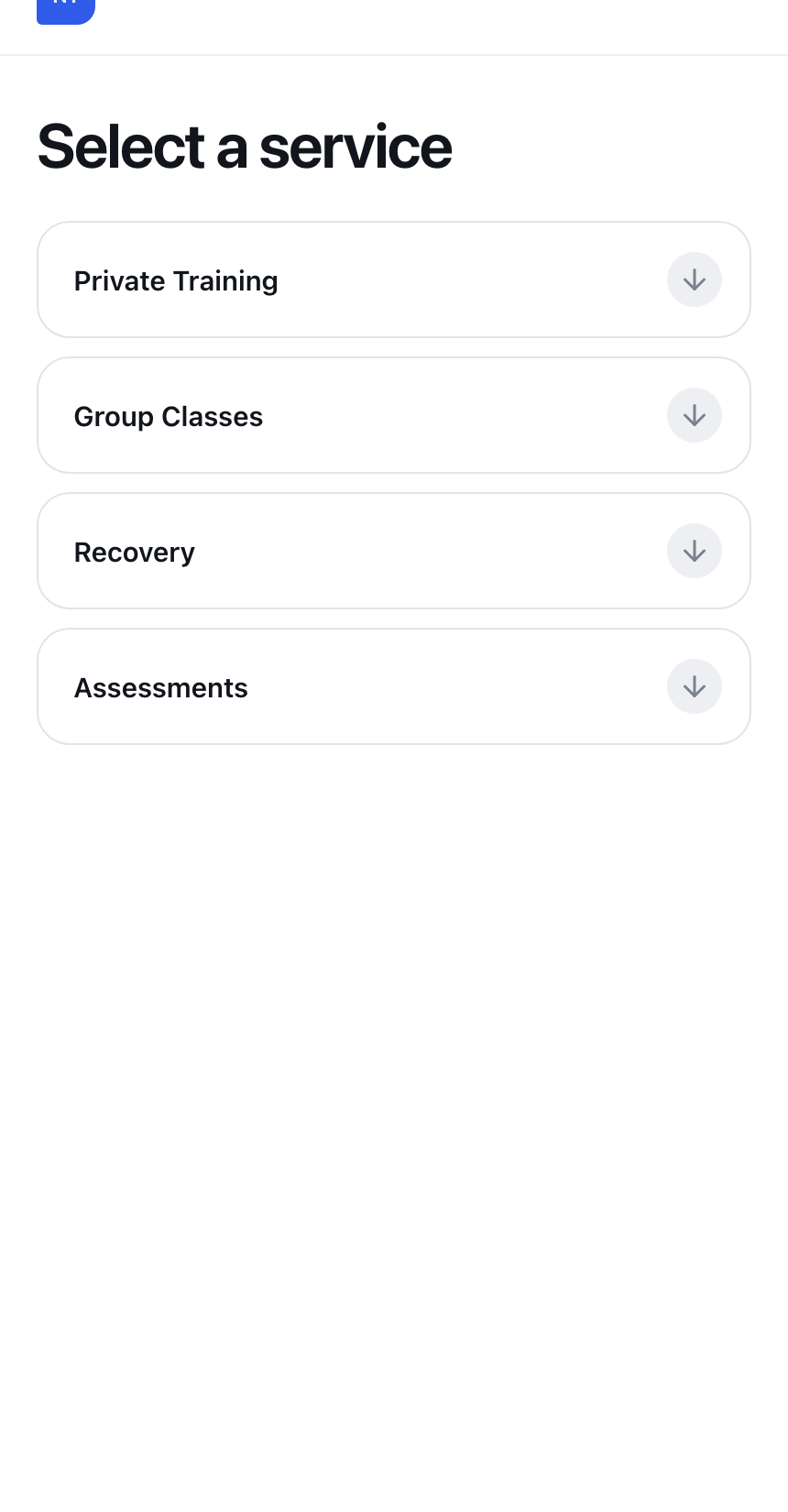
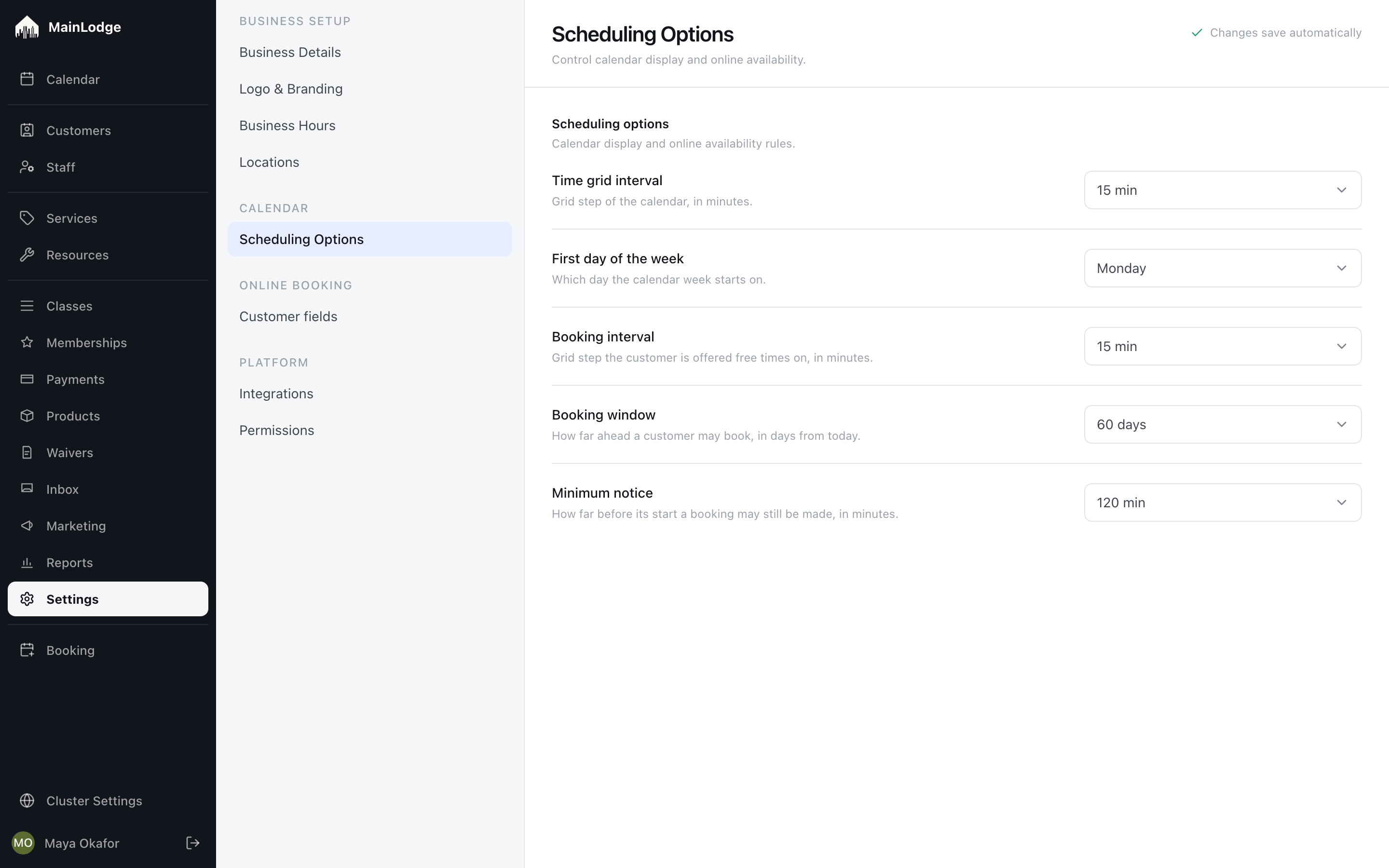
They pick a service, a person or 'anyone', a time, and leave their details — no account, no app to install. You choose how far ahead they can book, how late they can cancel and how much notice you need.
-
Clients book themselves
They pick a service, a person or 'anyone', a time, and leave their details — from any phone, no account needed.
-
Your rules, in plain settings
Choose how far ahead clients can book, how much notice you need, your cancellation and reschedule windows, and the late-cancel or no-show fee. Change it any time.
-
No fighting over the same slot
If two people go for one time at once, the second sees other times that day — without retyping anything.
-
A place for clients to manage themselves On the roadmap
Members see their upcoming sessions, how many sessions they have left and their waiver — and rebook within your rules.
-
Your name on it, not ours
Your logo, colours and photo on the booking page and every message clients receive.
-
Book from your own website
A booking button for your own site, plus a direct link to any service.
Know every client
Open a client and see everything you need.
What they booked, what they bought, how many sessions they have left, their waiver, their messages and your notes — found in a second.
Michael Lao
+1 (310) 555-0102 · client since Nov 2025
Next session
Thu 17 Sep · 07:00 · Private Training with Daniel
Recent visits
All 38 →- Thu 10 Sep Private Training · Daniel · Bay 2 Completed
- Tue 8 Sep Strength Class · Priya · Studio A Attended
- Sat 5 Sep Recovery Session · Self-serve Completed
- Thu 3 Sep Private Training · Daniel · Bay 2 No-show
Latest note · Daniel Reyes · Sep 10
Left knee still tender on deep squats — keep box squats through September, no plyo.
- Anna WeberValid to Aug 2027
- Michael LaoExpired
- Leo Park (15)Guardian needed
-
Find any client in a second
Type a name, phone number or email and open the person.
-
Everything about a client in one place
Open a client and see what they booked and bought, the packs and memberships they hold, and their calls and texts.
-
Notes the instructor sees in time On the roadmap
Write down what the next coach should know — it's attached to the person and shows up before the session.
-
Waivers that are actually signed
Clients sign your waiver on their phone right after they book; you see who is covered for the visit, and renewals are requested before they lapse.
Inbox & messages
Every text, email and call in one inbox, next to the client's next booking.
Clients text the studio number, reply to a reminder, or call. It all lands in one inbox the whole team shares, filed to the right person. Saved replies answer the common questions in a tap; soon, AI drafts the rest.
- MM Mark Miller2m TextCan I move Thursday to 7?
- AW Anna Weber18m EmailRe: Membership renewal
- KT Ken Tanaka1h CallMissed call · 09:41
- FO Fabrice Odero3h TextThanks! See you Saturday
- SR Sofia RamosYesterday AutomaticWaiver signed ✓
Mark Miller
Standard membership · 3 credits · next: Thu 6:00 pm with Daniel
Yesterday · email
Automatic · Reminder
Hi Mark — see you Thursday 6:00 pm with Daniel in Bay 1. Reply to this email or text us if anything changes.
Today · text
Suggested reply Coming soon
Done — you're booked Thu 7:00–8:00 pm with Daniel, Bay 1. Your 6:00 slot is released. See you then!
Will also move the session and send the new confirmation.
-
One inbox for texts, email and calls On the roadmap
Every message a client sends lands in one shared inbox, next to their next booking — whoever on the team picks it up.
-
Email clients without leaving MainLodge On the roadmap
Send and receive email from the client's page; replies file themselves to the right person.
-
Answer the common questions in one tap
Saved texts with the client's name, the time and the service filled in for you.
-
AI-drafted replies and actions Coming soon
A suggested answer to each message — and the reschedule or booking change it implies — waiting for your one tap of approval.
-
Text clients back and forth
Text a client from their page with your own business number; their replies land in the same place.
-
Reminders that go out on their own
Booking confirmations, reminders before the visit and cancellation notices by email and text — plus follow-ups that run themselves: a review request after a visit, a check-in after a cancellation, a waiver reminder before the first session.
-
Email and text campaigns Coming soon
Send offers and news to the right groups of clients, and set up the follow-ups that run themselves.
Get paid your way
Sell memberships, packs, private sessions and drop-ins — however your business works.
Some studios sell prepaid sessions. Some sell unlimited plans. Most sell a bit of everything. At checkout MainLodge works out what covers the visit, and you take the card.
- Price
- $360 / 2 weeks
- Commitment
- 4 of 6 cycles
- Member discount
- 37.5% services
Good for Private Training, Strength Class or Recovery · 1 expires Oct 2
- Sep 10 · Private Training · Daniel−1 · Redeemed
- Sep 9 · Strength Class−0.5 · Redeemed
- Sep 10 · Membership renewal+4 · Benefit
- Private Training · 60 minwith Daniel · covered by 1 credit$95.00$0.00
- Water bottlesold by Priya$25.00
-
Take payment at the desk
Check out a visit at the desk, sell a pack, take payment and refund it when you need to.
-
Cards online and on file
Take cards online, or keep a card on file at booking without charging it — then charge it at the visit, for a pack upgrade, or for a no-show.
-
Memberships
Recurring plans that give clients sessions every period, billed to their card automatically, with pauses your staff can grant.
-
Prepaid sessions and packs
Sell packs of sessions in advance, online or at the desk. Decide which services a pack covers and when it expires.
-
Sell it every way at once
Drop-ins, packs, unlimited memberships and class packs can all be on at the same time. Checkout works out which one covers the visit.
-
Gift cards
Digital gift cards with a personal message, seasonal promotions, and a report of what's still outstanding.
-
Sell products at the desk On the roadmap
Track what you sell over the counter, what it cost you and what's left on the shelf.
Group classes
Classes and private sessions, side by side.
A weekly class has a set number of spots, a sign-in list and a price — on the same calendar as your private sessions, and counted the same way in payroll and reports.
- ✓Anna W. credit
- ✓Fabrice O. credit
- ✓Leo P. drop-in $28
- ✓Michael L. credit
- ✓Sofia R. included
- ✓Ken T. credit
-
Group classes On the roadmap
Recurring classes with a set number of spots, a sign-in list and one-tap attendance — on the same calendar as your private sessions.
-
Charge for classes however you like On the roadmap
A class can use a credit, half a credit, a drop-in fee — or be included in a membership.
Staff and payroll
Know what you owe every instructor — without the spreadsheet.
Invite the team, decide what each person can see and change, set their hours — and let the month-end total add itself up from the sessions actually taught.
- DR Daniel ReyesInstructor
- MO Maya OkaforOwner · Admin
- PN Priya NairInstructor
- SL Sofia LindqvistFront desk
- TA Tom AbernathyInstructor
Priya Nair
priya@northline.example · since Mar 2025
Role & access
Instructor
Own calendar and own clients.
Can't refund, change rates or see others' pay.
Google sign-in · active today 09:42
Working hours
- Mon07:00 – 13:00Tue—Wed07:00 – 13:00Thu12:00 – 20:00Fri07:00 – 13:00Sat08:00 – 12:00Sun—
Pay rules
- Private Training$30 / session
- Strength Class$50 + $8 / head
- Assessment$45 / session
- Staff time$22 / hour
Frozen on each earning.
September so far
$1,384.00
- Private 31$930.00
- Classes 4 · 46 heads$368.00
- Assessments 2$90.00
● On track · 12 booked this week
- Private sessions 18 × $30$540.00
- Strength Class 4 × ($50 + $8/head)$392.00
- ClassPass sessions 3 × $25$75.00
- Paid staff time 2.5 h × $22$55.00
- Google review bonus$10.00
- Package commission 5% of $70$3.50
Rates are frozen on each earning — changing a rate never rewrites a paid month.
-
Decide what each person can see and do
Invite the team and choose what instructors, front desk and managers can see or change. Instructors can run their own day.
-
Working hours per person and per location
Set each instructor's weekly hours and each location's opening hours; the calendar greys out the rest.
-
Know what you owe every instructor
Per-session rates add up to a monthly total per instructor — ready for whoever runs your payroll.
-
Sign in with Google
Password or Google — whatever your team prefers.
Know what brings clients in
See which Instagram post, partner or promotion actually brought in a paying client.
Links for partners and influencers, bookings traced back to the post or flyer, and reviews that keep new clients coming.
| Source | Clicks | New | Revenue | Kept 90d |
|---|---|---|---|---|
| SarahFit · Instagram | 84 | 11 | $2,450 | 9 |
| Reel · 12 Apr carving | 890 | 31 | $5,640 | 22 |
| Ikon Stoke Event | 42 | 6 | $1,180 | 5 |
| Groupon | — | 14 | $980 | 3 |
northline.co/buy/12-pack?ref=sarahfit -
Links for partners and influencers On the roadmap
Give a partner or influencer their own link to any service, pack or membership, and see exactly which paying clients it brought in.
-
Know which post brought them in On the roadmap
See whether a client came from an Instagram post, a flyer or a Groupon — plus a 'how did you hear about us?' that actually gets answered.
-
Reviews and loyalty Coming soon
Ask happy clients for a review at the right moment, and reward the ones who keep coming back.
Know how the business is doing
Answers to the questions you actually ask.
What did we sell, what came in, what's on the shelf. Then which rooms and machines are sitting empty, how many prepaid sessions you still owe, and who changed what.
-
See how the business is doing
What you sold in any period, by service and by payment method, and what you owe each instructor.
-
Several locations, one account On the roadmap
Each site has its own team, equipment, hours and calendar; you see them all.
-
See who changed what
Every booking and record keeps its history — who changed it, and when.
-
Bring your clients and balances with you
We import your clients, upcoming appointments, pack balances, memberships and gift-card balances from Mangomint, Mindbody or a spreadsheet, and check the totals with you before you switch.
-
Send sales to your accountant Coming soon
Push sales and payouts to QuickBooks or Xero.
Coming soon
On the way, and labelled honestly.
These aren't in MainLodge yet. They're here because they matter, and so you can hold us to them. Missing something else? Ask — we build what studios need.
-
AI-drafted replies and actions
Coming soonA suggested answer to each message — and the reschedule or booking change it implies — waiting for your one tap of approval.
-
Email and text campaigns
Coming soonSend offers and news to the right groups of clients, and set up the follow-ups that run themselves.
-
Reviews and loyalty
Coming soonAsk happy clients for a review at the right moment, and reward the ones who keep coming back.
-
Send sales to your accountant
Coming soonPush sales and payouts to QuickBooks or Xero.
-
Your own member app
Coming soonA MainLodge app with your name on it, for booking and check-in on iPhone and Android.
-
AI assistant
Coming soonAnswers client questions, finds a free time and books it — on your website and by text, around the clock.
-
On-demand video
Coming soonSell or include recorded sessions alongside the live ones.
-
Connect your other tools
Coming soonA public API and Zapier, so MainLodge talks to the rest of what you use.
See MainLodge on your own schedule.
A 30-minute walkthrough with someone who runs a studio on it. Bring your messiest week.