MainLodge for personal-training studios
Every trainer hour sold. Every session balance right.
Each trainer's week on one calendar, session packs that count down as clients train, memberships billed to the card, online booking with your notice rules, and texts from your business number — built inside our own training studio.
Built inside our own studio. Founding-studio places open for personal training studios.

How it actually runs
What a week looks like in personal training studios.
1:1
is the product
The trainer's hour is the inventory. An empty 7 am slot is revenue that never comes back.
12
sessions in a typical pack
Clients buy ahead and use over months. The balance has to be right every single time they walk in.
60%
of sessions repeat weekly
The same client, the same trainer, the same time. Booking them one by one is how slots get lost.
Where the week breaks
The problems that show up at the desk, not in a brochure.
-
Recurring clients are booked by hand.
Thursdays at 7 for the next three months means twelve bookings and one missed one.
-
Session balances live in the trainer's head.
"I think you have four left" is a conversation nobody wants to have at the front desk.
-
Late cancels are a judgment call.
The rule is 24 hours. Whether it's applied depends on who's on the desk and how the client asks.
-
Payroll is a spreadsheet on Sunday night.
Sessions, splits per trainer, small-group rates and no-shows, reconciled by hand from three sources.
What MainLodge does about it
One calendar, one client record, one set of rules — that fit this room.
Real screens from the product. Anything marked “On the roadmap” isn’t shipped yet — it’s shown as the design we’re building to.
A trainer's week, with the recurring clients already in it.
Each trainer has working hours and a column on the calendar, and clients book them online or the desk books them in. Standing weekly bookings that repeat on their own are on our roadmap.
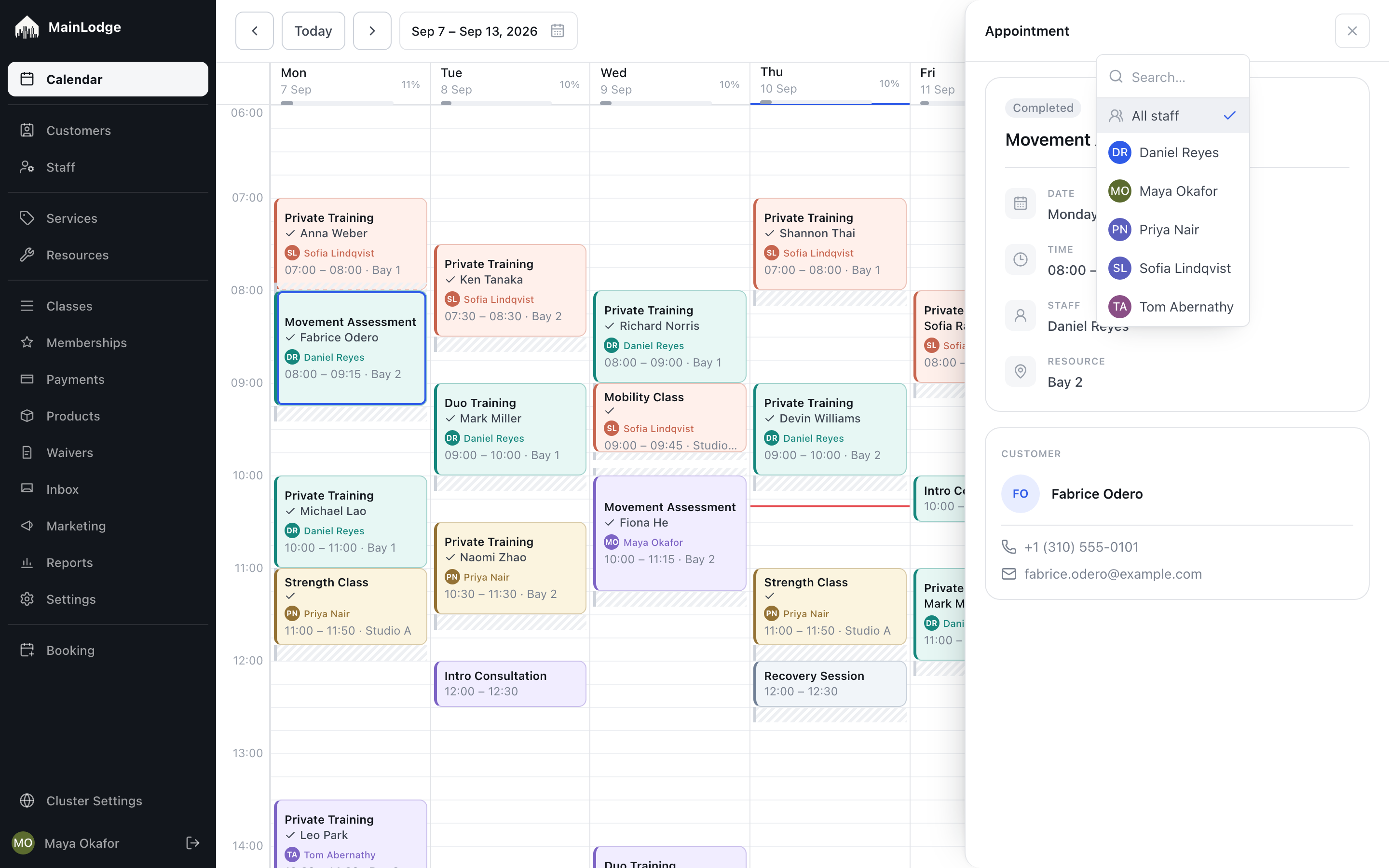
One trainer's week — 1:1s and small groups.
Session packs with live balances.
A 12-pack counts down as sessions are attended. The balance shows on the client record and at booking, and a cancelled session goes back on the balance.
Michael Lao
+1 (310) 555-0102 · client since Nov 2025
Next session
Thu 17 Sep · 07:00 · Private Training with Daniel
Recent visits
All 38 →- Thu 10 Sep Private Training · Daniel · Bay 2 Completed
- Tue 8 Sep Strength Class · Priya · Studio A Attended
- Sat 5 Sep Recovery Session · Self-serve Completed
- Thu 3 Sep Private Training · Daniel · Bay 2 No-show
Latest note · Daniel Reyes · Sep 10
Left knee still tender on deep squats — keep box squats through September, no plyo.
A client record — what they bought, what's left, what's next.
Rules that apply themselves.
How far ahead clients can book and how much notice you need are settings, and they apply the same way to everyone. Cancellation windows with late-cancel charges are next on our roadmap.
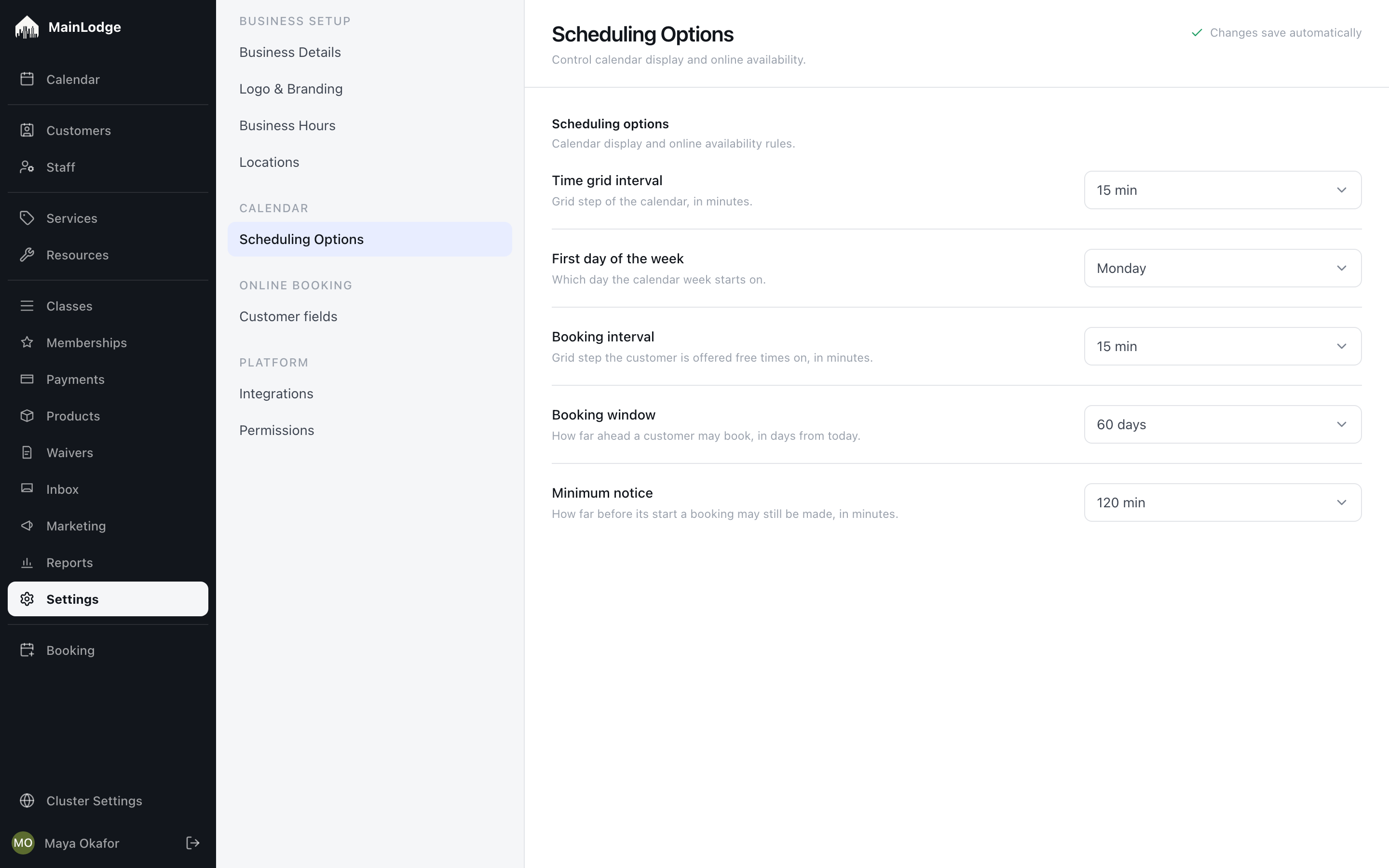
Studio rules as settings, not tickets.
Pay built from delivered sessions. On the roadmap
Each trainer's pay run comes from the sessions they delivered, with a rate per service type. Small-group sessions split by your rule. Export it or hand it to your bookkeeper.
- Private sessions 18 × $30$540.00
- Strength Class 4 × ($50 + $8/head)$392.00
- ClassPass sessions 3 × $25$75.00
- Paid staff time 2.5 h × $22$55.00
- Google review bonus$10.00
- Package commission 5% of $70$3.50
Rates are frozen on each earning — changing a rate never rewrites a paid month.
Trainer pay from the calendar.
Live today
What a studio can use on day one.
Shipped and running at Home Mountain, our own studio in Los Angeles.
- Clients book themselves. They pick a service, a person or 'anyone', a time, and leave their details — from any phone, no account needed.
- Day and week calendar. Every appointment on one calendar, a column per instructor, and a week view for any one person. Drag an appointment to move it.
- Rooms, bays and equipment. Tell MainLodge what a session physically needs — a reformer, a simulator, a room — and it books whichever one is free.
- Set-up time and working hours. Add clean-up or set-up time around a service, and grey out the hours each person doesn't work.
- Prepaid sessions and packs. Sell packs of sessions in advance, online or at the desk. Decide which services a pack covers and when it expires.
- Memberships. Recurring plans that give clients sessions every period, billed to their card automatically, with pauses your staff can grant.
- Take payment at the desk. Check out a visit at the desk, sell a pack, take payment and refund it when you need to.
- Waivers that are actually signed. Clients sign your waiver on their phone right after they book; you see who is covered for the visit, and renewals are requested before they lapse.
- Reminders that go out on their own. Booking confirmations, reminders before the visit and cancellation notices by email and text — plus follow-ups that run themselves: a review request after a visit, a check-in after a cancellation, a waiver reminder before the first session.
- Text clients back and forth. Text a client from their page with your own business number; their replies land in the same place.
- Book from your own website. A booking button for your own site, plus a direct link to any service.
- Your name on it, not ours. Your logo, colours and photo on the booking page and every message clients receive.
The full list, including what's on the roadmap: MainLodge features.
A worked example
Example: a 5-trainer studio with three rooms and two small-group formats
The setup we'd build with you before the demo.
| Rooms | Bay 1, Bay 2, Turf |
|---|---|
| Services | 1:1 training (60), 1:1 express (30), Duo training, Small group (cap 4), Assessment |
| Trainers | 5, each with availability, the services they deliver and a pay rate per service |
| Ways to pay | Single session, 6-, 12- and 24-packs, monthly 2×/week membership |
| Rules | 24-hour minimum notice online, 10-minute buffer between sessions, text reminder the evening before |
Switching
We move your data with you, then run both for a while.
Clients, remaining balances, active memberships and future bookings come across. We cut over on a quiet day, and you keep an export at every step. Anything that isn't built yet, we'll tell you before you sign.
Questions we get
Questions from personal training studios.
- Can a client have a standing weekly slot with their trainer?
- Not automatically yet — standing weekly bookings are on our roadmap. Today the desk books the slots ahead on the trainer's calendar, and the client gets a reminder before each one.
- How are session packs tracked?
- Each attended session reduces the balance; the balance is visible to the desk, the trainer and the client. Packs can have expiry dates.
- Can trainers see only their own schedule?
- Yes. Staff roles control who sees what — a trainer sees their column and their clients, the owner sees everything.
- How does trainer pay work?
- A rate per service type per trainer; pay is calculated from delivered sessions, with small-group splits by your rule. Pay reports are on our roadmap; today every session records who delivered it.
- Do clients sign a waiver?
- Yes. After booking, the client signs your waiver on their phone; it expires when you set and they're asked to renew before it lapses.
- Can we take payment for a pack online?
- Yes, and the balance starts counting the moment it's paid.
Writing your rules? Our free cancellation, no-show & reschedule policy generator drafts the policy for your booking page and shows what no-shows cost personal training studios.
Also built for
Most studios are two of these at once.
Bring one trainer's week and one client's pack.
We'll set up your rooms, services and trainers before the demo, and show the pay run at the end of it.